Cookie banners are small pop-up notifications that appear on the first visit to a website. But, not all cookie banners are made equal! Some will help you achieve compliance, some may not. This article will look at some GDPR cookie consent examples that are worth emulating on your website and will ensure your compliance.

A cookie consent banner is a cookie notification in the form of a banner or pop-up that explicitly asks for users’ opt-in consent before deploying cookies. Meaning, it does not merely notify the user about cookies on a website but asks for consent before setting them on the user’s browser.
A cookie consent banner gives users the option to consent, deny or set their cookie preferences. It should be displayed when a user visits a website and should be displayed in the consequent visits according to the user’s decision on the first visit.

How does a cookie consent banner work?
To understand what happens behind the scenes of a cookie banner, from user interaction to consent storage, check out this visual guide (click the image to download):
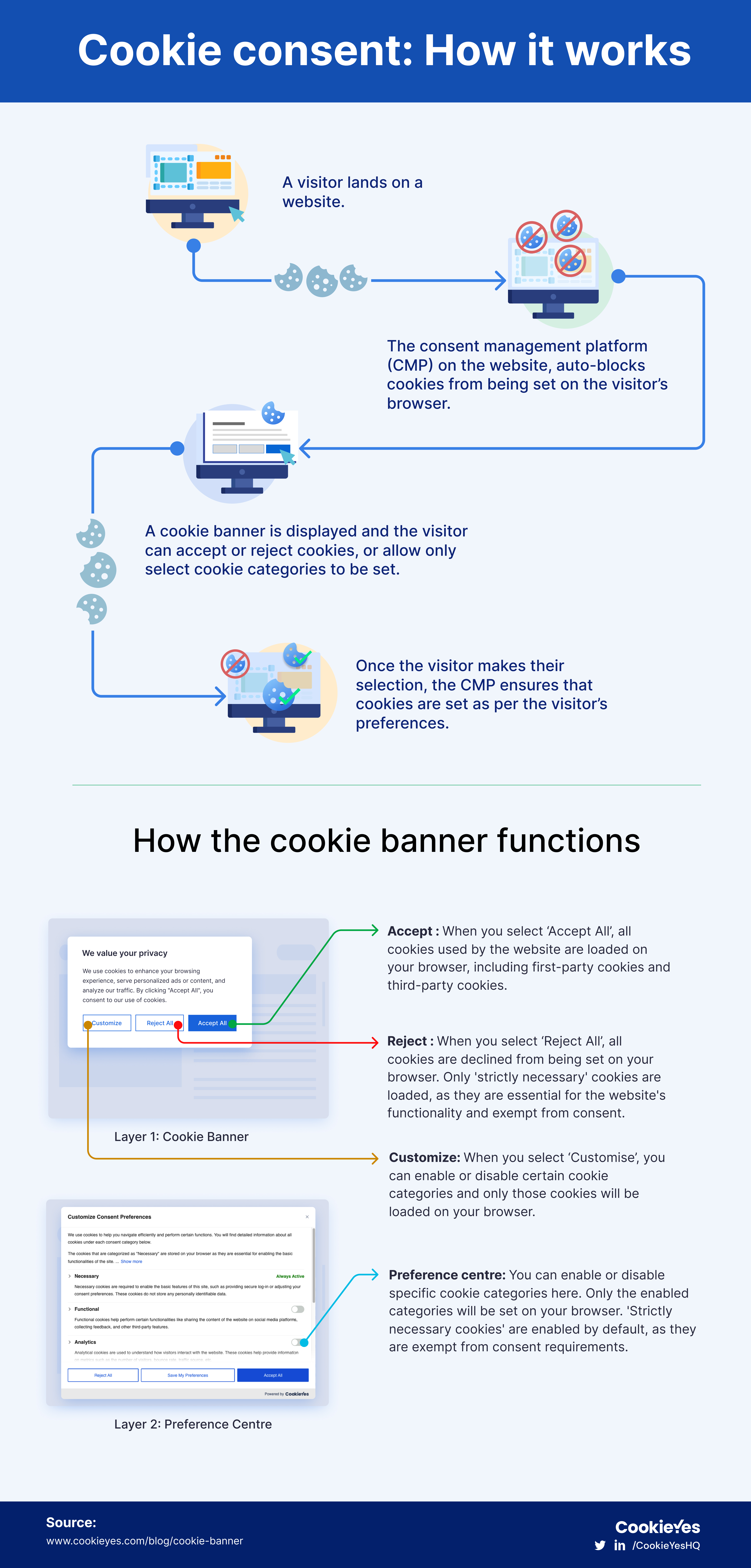
Download the infographic as PDF
What’s GDPR cookie consent?
According to the General Data Protection Regulation (GDPR), consent should be freely given, specific, informed and unambiguous (Article 4(11). As GDPR categorizes cookies as ‘online identifiers’ that are part of personal data, cookies require consent.
If your business is based in Europe or you have visitors from Europe, your cookie notice should adhere to GDPR cookie consent. Not just GDPR, the ePrivacy Directive (ePD or EU cookie law) also requires that users must give consent before websites store cookies in their browsers.
You should display a cookie consent banner that informs users about the cookies present on the website, and the purpose of cookies so users can make an informed choice to accept or decline cookies.
What should my cookie consent banner say?
A cookie consent banner should have the following key components.
Cookie consent message: Text that informs users that your website stores cookies. It should include a very brief note of why your website uses these cookies.
Consent options: Cookie banners should give users the option to consent (Accept button), decline (Reject button) or manage cookie settings (Customise button) when they visit your website.
Preference centre: In the banner’s second layer, where users can manage cookie preferences by category (e.g., essential, analytics). It should also have a full cookie list.
Cookie policy: A link to your cookie policy that describes your website’s use of cookies, their categories and how users can manage cookies.
Cookie consent banner checklist
To comply with GDPR and ePrivacy Directive, you should keep in mind the following points for your cookie consent banner:
- Use clear and simple language for the cookie notice.
- Briefly explain the purpose of cookies used.
- If the website uses third-party cookies, then mention that in the banner.
- Provide both ‘Accept’ and ‘Reject’ buttons prominently on the banner, so users have a free choice.
- You may also add a close button to dismiss the banner without setting cookies.
- Include a ‘Customise’ button so users can give granular consent for specific cookie categories.
- Show a cookie list on the second layer (Preference centre) of the banner for complete transparency.
- Include a link to Cookie Policy or Privacy Policy (that has a cookie clause).
- Add a revisit widget so users can easily change their cookie preference or withdraw consent.
- Avoid using dark patterns that mislead or trick users into giving consent.
Display cookie consent banner and
get GDPR compliant in no time
Try for free 14-day free trialCancel anytime
From small businesses, startups, and personal websites to large-scale businesses, over 1.5 million websites use the CookieYes consent management platform for GDPR compliance. Here are some hand-picked cookie notice examples from regions like UK, EU, etc .
1. Grand Opera House
Northern Ireland’s premier theatre Grand Opera House uses a bottom-left cookie popup that can be expanded to allow users to manage and enable specific cookie categories, ensuring a user-friendly experience.
Why it works:
- Clear, equal consent options
- Compact, unobtrusive placement
- Easy access to cookie policy

2. Dishoom
UK’s popular restaurant chain, Dishoom is a good example of how cookie banners can be part of your website without disrupting design or branding. (Cue: their playful cookie message!) This website shows how privacy and design can go hand in hand.
Why it works:
- Unique, engaging copy aligned with brand voice
- Clear accept, reject and customise options
- Seamlessly integrated with website aesthetics

3. Coventry University
The UK’s Coventry University uses a clear, full-width footer cookie banner, explicitly explaining necessary and additional cookies.
Why it works:
- Clear, transparent consent wording
- Explicit distinction between necessary and additional cookies
- Easy-to-use buttons for full cookie control

Under GDPR, necessary cookies are exempt from consent as they are essential for a site to function.
4. Hyundai Motorsport
Hyundai Motorsport uses a simple box layout banner with ‘accept, ‘reject’ and ‘preferences’ buttons at the same level.
Why it works:
- All cookie consent choices clearly presented at equal prominence
- Compact, unobtrusive design
- Direct messaging aligns with GDPR standards

5. Filmin
Spanish video-on-demand platform Filmin uses a popup cookie banner with clear options, so users can make an informed decision.
Why it works:
- Prominent popup ensures user attention
- Clearly labelled choices for informed consent
- Easy access to privacy and cookie policies
- Localised in user’s language (Spanish) for better understanding

Displaying a banner in your website visitor’s preferred language ensures they can make an informed decision, in compliance with GDPR’s requirements.
6. EORTC
Non-profit cancer research organisation EORTC’s footer banner effectively empowers users with clear messaging and equally prominent options to accept, reject, or manage cookie preferences.
Why it works:
- Clearly presents equal consent choices
- Direct and transparent language
- Unobtrusive footer placement ideal for professional sites

GDPR applies to non-profits as well, meaning that even if you’re not selling products or services, you must comply with its consent rules if you process personal data from EU residents.
7. Travis
The official website of Scottish rock band Travis features a sleek footer cookie banner, that aligns with the site’s signature colours.
Why it works:
- Clear, balanced consent choices
- Brand-consistent styling
- Non-intrusive footer placement for better UX

Cookie banners aren’t just for big businesses— websites used for professional or commercial purposes must also comply with GDPR if they collect data from EU users.
8. OBR UK
UK’s independent fiscal watchdog, OBR uses a simple cookie consent banner that does not take up space in the site’s viewport and uses a design that effectively falls into place on this website.
Why it works:
- Simple and unobtrusive design
- Clear accept, reject and settings options
- Effective integration into a professional website layout

9. Winchester Cathedral
UK’s historic landmark Winchester Cathedral’s official website ses a banner that complies with IAB TCF requirements. IAB TCF banners enable publishers to collect and manage user consent and communicate preferences to advertisers, vendors and technology partners.
Why it works:
- Fully compliant with IAB Europe’s Transparency and Consent Framework
- Clear, detailed messaging for transparency
- Easy access to cookie customisation and controls
- Prominent placement ensures visibility and user engagement

10. CookieYes
While we help over 1.5 million+ websites worldwide get GDPR-compliant, we make sure our site is just as on-point. You must have noticed our banner, but did you notice our cookie consent widget? Once visitors make their choice and the banner is dismissed, they can easily bring it back by clicking the widget to adjust their cookie settings at any time!
Why it works:
- Persistent widget enables easy, ongoing consent management
- Clear options for accepting, rejecting or customising cookies
- Detailed and transparent preference centre for granular consent

GDPR mandates that websites allow users to withdraw cookie consent at any time, ensuring the process is as simple as providing consent.
These 10 GDPR cookie banner examples show that compliance doesn’t mean compromising on design or user experience.
Whether you are in the UK, EU, or targeting users in those regions, these examples can guide you in creating a banner that’s both legally compliant and user-friendly.
To ensure foolproof compliance with GDPR cookie consent, CookieYes helps websites to:
- Create a cookie banner with custom design, content and layout
- Add custom branding, CSS customizations for a great user experience
- Auto-translate the banner in 40+ languages
- Geo-target the banner to align with local privacy laws
- Auto-block third-party cookies till user gives consent
- Generate a custom cookie policy with complete cookie list
- Record user consents for proof of compliance
- Scheduled website scanning for auto-updating cookie list
- Integrate with Google Consent Mode and IAB TCF
- Support browser’s Do Not Track (DNT) settings
- Comply with multiple laws like CCPA, LGPD, POPIA etc.
How to add a cookie consent banner on your website?
If you want to emulate these GDPR cookie consent examples on your website, sign up to CookieYes and generate a GDPR-compliant cookie banner in just 3 simple steps.
Step 1. Sign up for FREE (14-day free trial. Cancel anytime)
Step 2. Choose the banner style, customize it, and copy the code.
Step 3. Paste the code on your website (Use our setup guide for help)
Your cookie banner will be live on your website!
Frequently asked questions
Cookie consent works by displaying a cookie banner or popup when a user visits a website and giving them the option to accept (give consent), reject or modify cookie preferences.
Using a cookie banner, a user can give consent to all the cookies on a website, deny them altogether or provide granular consent i.e. enable/disable specific cookie categories. Other than strictly necessary cookies, which are exempt from cookie consent, users are given the ability to decide whether a website can drop cookies on their device or not.
Users will also have the ability to withdraw consent at any time after they have given consent. The cookie consent banner or popup will leave a ‘cookie widget’ or callback button so the user can revisit their cookie settings.
You should renew cookie consent at least once a year (as per the ePrivacy Directive) or have periodic renewal as per the guidelines set out by your local data protection authority (DPA). For instance, the Irish DPC and the French CNIL recommend that consent should be re-obtained after no longer than six months.
The GDPR does not specify a time limit for how long consent will last, therefore you should set a renewal period as per the guidelines of your respective DPA.
If your website uses third-party analytics services like Google Analytics that collect and process your visitors’ personal data, consent is required. As per the official guidance by Google, if you have enabled the Google Analytics Advertising Features such as remarketing, and display network impression reporting, you must obtain consent for cookies and disclose the information in your privacy policy.
In addition to this, you should strongly consider obtaining consent for collecting user ID, other pseudonymous identifiers and geographic data (postal code, location coordinates).
A cookie consent manager is a tool or software you can use to obtain cookie consent and manage them on your website. Cookies are useful for improving user experience and website function, but sometimes they can be privacy-intrusive, leading many privacy laws to put strict regulations on legally using them.
Cookie consent managers like CookieYes help you to get permission from your website visitors to place cookies on the site, block third-party cookies before permission is granted, allow users to opt in or out of them, and record all of their cookie consent preferences.
No. GDPR requires users be able to reject non-essential cookies just as easily as they accept them.
Yes.If your website targets users in the EU or UK, GDPR applies regardless of where your company is based.

Kavya is a content designer who works across marketing, and product to create simple, user-first content. She brings expertise in long-form content, UX writing, and copywriting for B2C and B2B brands. In her downtime, she’s probably watching re-runs of mobster dramas and baking.