From enabling secure sessions to analysing engagement metrics, internet cookies support the dual goals of functionality and data-driven improvement. They are primarily classified into:
- Essential cookies: Necessary for core operations, and
- Non-essential cookies: Fulfil additional purposes such as analytics and personalisation.
Unlike essential cookies, which are critical for basic website functions, non‑essential cookies are not mandatory for the site to operate. In this article, we break down what non-essential cookies mean for your business and how they are governed under major privacy regulations.
What are non-essential cookies?
Non-essential cookies or non-necessary cookies serve purposes beyond core site functionality and help improve user experience, measure engagement, and personalise content.
They range from analytics cookies that track how users navigate a site to advertising cookies that build detailed profiles for targeted ads.
Because non-essential cookies can involve processing of personal information, most data protection frameworks treat them as personal data.
GDPR requires explicit cookie consent before placing non-essential cookies on a device. To stay compliant, websites must clearly inform users about the cookies in use, obtain prior consent for analytics and marketing cookies, and provide an easy way to withdraw consent at any time.
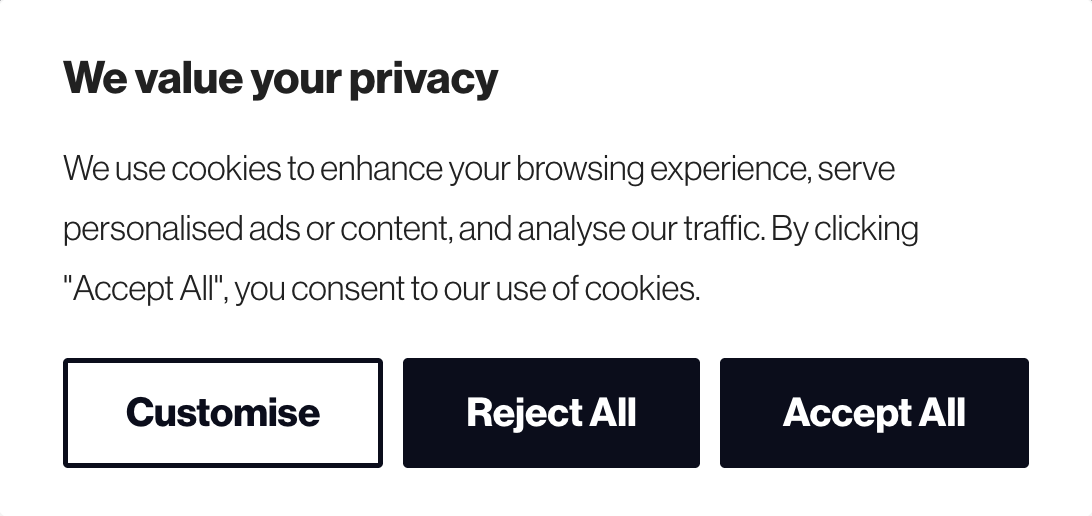
Like in the example above, CookieYes enables GDPR-compliant cookie consent by
- Automatically scanning for non-essential cookies
- Categorising them correctly, and
- Collecting compliant consent via a customisable cookie banner
Non-essential cookies can be further classified into different categories, including:
- Analytics cookies: Track user behaviour, page views, and session duration.
- Advertising/marketing cookies: Collect data for targeted ads or remarketing campaigns.
- Functional cookies: Enhance usability by remembering user preferences not essential to site operation.
- Social media cookies: Enable likes, shares, and embedded content tracking.
Examples and use cases of non‑essential cookies
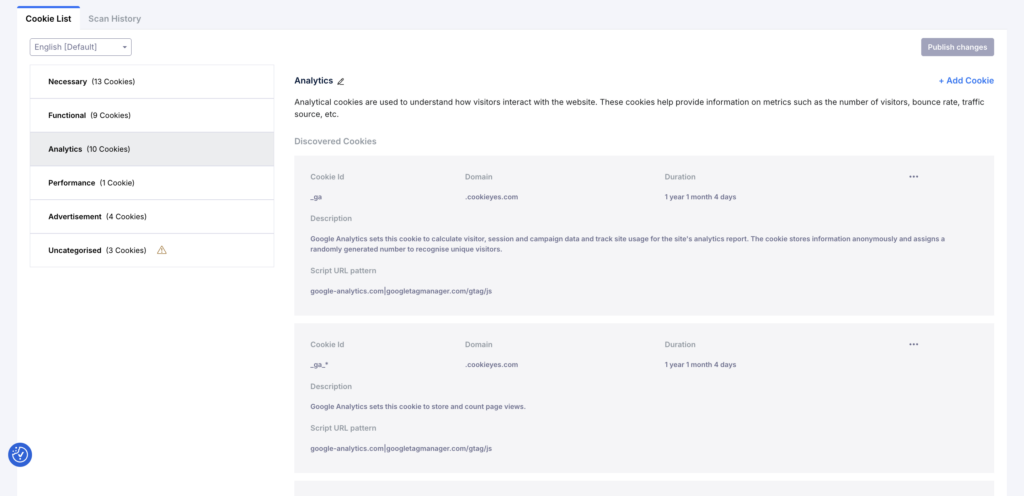
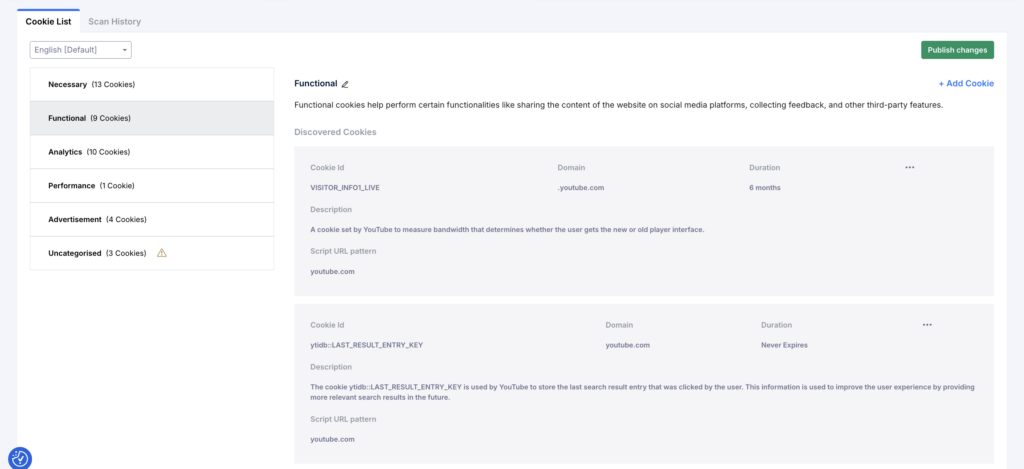
To find cookies on your site, click Scan now in the Cookie Manager in your CookieYes account. You can also schedule scans to automate the process.
Once the scan is completed, you will get the list of cookies on your site along with details like cookie ID, cookie duration, domain, description and URL script pattern.
Now, let’s discuss the different types of non-essential cookies in detail.
Analytics cookies
Analytics cookies help site owners understand how users interact with a site. They measure traffic sources, time on page, bounce rates and user flows, enabling data‑driven improvements.
Tools such as Google Analytics and Clarity rely on these cookies to collect data. Generally, analytics cookies require consent in opt-in regions and should be disclosed in the privacy or cookie policy.
Some analytics cookies last only a few minutes, while others can stay on a user’s device for months or even years. Scan your site to see the duration of each cookie automatically, along with other details.
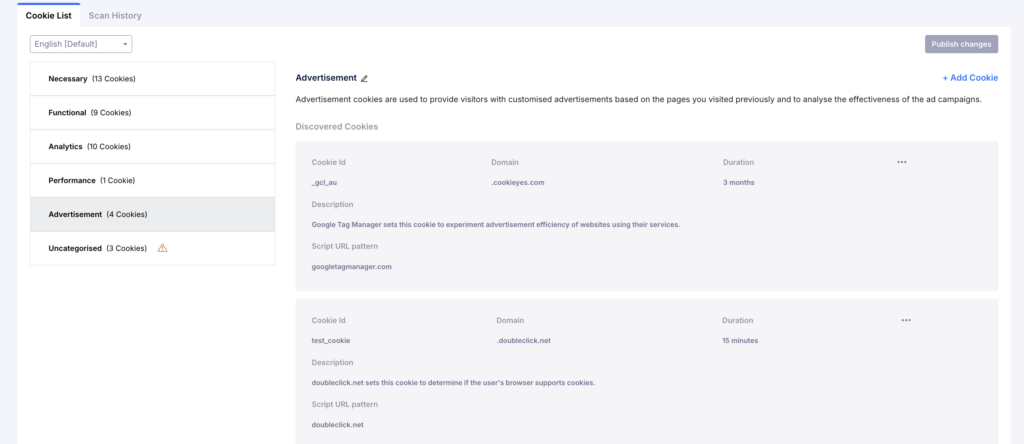
Advertising and tracking cookies
Third‑party advertising cookies are typically persistent and track users across multiple sites. Advertising cookies also build user profiles to deliver personalised ads and limit how often a user sees the same ad.
Because these cookies involve significant data sharing, regulators treat them as non‑essential; they require an opt‑in consent in the EU, and have to follow opt-out requirements in the US.
Functional cookies
Functional cookies remember a user’s language preference or region, enhancing personalisation. They may not be strictly necessary, but improve the user experience and typically require consent when personal data is involved.
Social media cookies
They enable websites to integrate features from third-party platforms such as Facebook, LinkedIn, or X. Additionally, social media cookies let users share content, like posts, or interact with embedded feeds directly on a webpage.
However, these cookies can also track users across websites, building detailed profiles for targeted advertising and behavioural analysis. Because they involve data sharing with third-party networks, they are classified as non-essential and require explicit user consent under privacy laws like the GDPR.
First‑party vs third‑party cookies
Cookies can also be classified based on who sets them. First‑party cookies are set directly by the site a user visits and typically support core functions or analytics. Whereas third‑party cookies are placed by external domains (e.g., ad networks or social media platforms) and track users across websites.
For example, if a video from YouTube is embedded on xyz.com, YouTube may set a cookie on the visitor’s browser to track video views. This is considered a third-party cookie.
Not all first-party cookies are non-essential; those needed for website function are considered essential.
Differences: Essential vs non-essential cookies
Understanding the differences between essential and non-essential cookies is crucial for both compliance and effective consent management.
Essential cookies
Without essential or technically necessary cookies, basic website features such as secure logins, shopping carts, or page navigation may not function properly. Therefore, these cookies are fundamental to the core functionality of a website. These cookies do not require user consent, as they serve legitimate purposes directly related to providing a service requested by the user.
Examples of essential/necessary cookies:
- Session cookies: Maintain user sessions and authentication during browsing.
- Security cookies: Protect against fraudulent activity or unauthorised access.
- Load-balancing cookies: Ensure website stability and performance.
They handle minimal data processing and are often exempt from strict consent requirements under the GDPR and similar laws.
Non-essential cookies
Non-essential cookies, on the other hand, are used to collect additional information that enhances functionality, analytics, or marketing efforts. These cookies are not necessary for the site to operate, but help optimise performance and user engagement.
Because they process user behaviour and identifiers, they fall under stricter privacy requirements.
Related read
Legal requirements for non-essential cookies
Under data protection laws such as the GDPR and ePrivacy Directive, non-essential cookies cannot be set without user consent. Consent must be:
- Freely given: Users should have a real choice to accept or reject.
- Informed: They must understand what data is collected and why.
- Specific and granular: Users should consent to each cookie category separately.
- Revocable: They must be able to withdraw consent easily.
Implementing a compliant cookie banner helps ensure these requirements are met. CookieYes enable businesses to design branded cookie banners and automatically apply users’ consent preferences across their website, simplifying compliance while respecting user choice.
Meet global cookie consent requirements
with one tool
Create your cookie banner with CookieYes CMP- Trusted by 2M+ businesses worldwide
Sign up for free14-day free trialCancel anytime
GDPR and ePrivacy Directive
The General Data Protection Regulation regulates how personal data collected via cookies can be processed, while the ePrivacy Directive governs the placement of cookies themselves. Together, they require websites to disclose cookie purposes clearly and to obtain explicit consent for non-essential cookies.
This is what is commonly known as opt-in consent, and is also followed by non-EU countries like Brazil, Canada and the UAE.
CCPA and US state laws
In the United States, there is no federal privacy legislation. The personal data processing is governed by state laws.
The California Consumer Privacy Act (CCPA) require businesses to inform users about data collection through cookies and offer an opt-out option for the sale or sharing of personal data.
For this, websites should provide a “Do not sell or share personal information” link or similar opt-out alternative on their website.
Additionally, they must also honour Global opt-out signals.
More than 20 US states have already enacted their privacy regulations. The list includes Virginia, Utah, and Colorado.
Other global frameworks
Beyond the EU and the US, several countries have enacted similar privacy laws to regulate cookie use:
- Canada (PIPEDA): Requires transparency and meaningful consent for data collection and tracking.
- Brazil (LGPD): Aligns closely with GDPR, mandating consent for the processing of personal data through cookies.
- India (DPDP Act): Introduces clear obligations for data fiduciaries, emphasising lawful and consent-based data processing.
- South Africa (POPIA) and Australia (APPs): Also call for transparency and consent when cookies collect personal information.
Each of these frameworks reinforces the principles of user control, transparency, and accountability in cookie management.
How to manage non-essential cookies: Cookie banner requirements
Cookie consent requirements vary across different regions. However, here are the key tips for websites managing non-essential cookies:
Conduct a cookie audit
Before you can manage cookie consent properly, you need to know what’s running on your site. A cookie scan helps you:
- Identify every cookie in use and who sets them
- Understand what each cookie does
- classify them by purpose (such as analytics, advertising, functional, or essential)
- Determine cookie duration
This step is important because websites often pick up new cookies over time through marketing tags, plugins, A/B testing tools, chat widgets, or embedded content, sometimes without anyone noticing.
Instead of manually hunting through scripts and browser developer tools, you can scan your website using CookieYes to automatically detect cookies and trackers, categorise them, and generate a structured cookie list. The same information can then be reflected in your cookie banner and cookie policy, which makes it much easier to stay transparent and keep your consent setup aligned with what’s actually happening on your site.
At the same time, you don’t have to give up control. If you want to add specific cookies yourself or fine-tune what appears in your cookie list, CookieYes lets you manually add cookies too. This way, you get the speed and accuracy of automation, along with the flexibility of manual control when you need it.
Use a cookie banner
Create a cookie banner that matches the privacy requirements applicable to your website. From the Consent template dropdown, choose the option that aligns with your audience’s location, such as GDPR, US State Laws, or GDPR & US State Laws.
Why is this useful? Because cookie consent rules vary by region. Using the right template helps you present the correct consent experience automatically, without having to build and manage multiple banners manually.
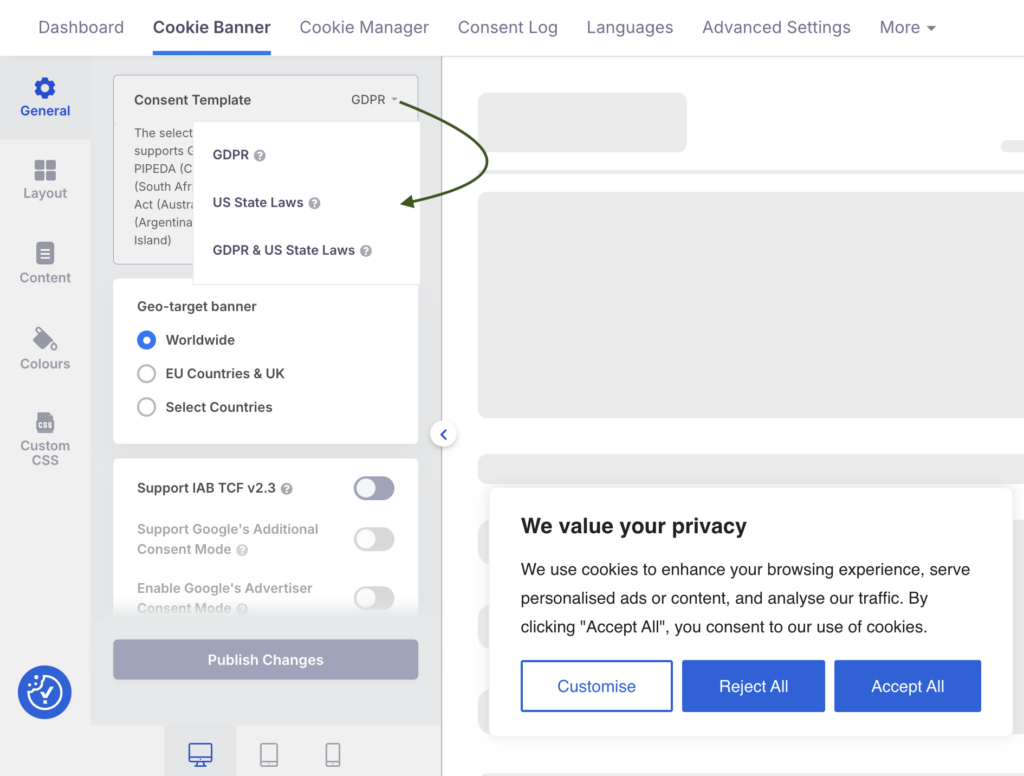
For example, if you serve Europeans, your banner should comply with GDPR and ePrivacy requirements.

Opt-in banners should:
- Present Accept, Reject and Customise options with equal prominence.
- Describe the cookies on your site
- Avoid pre‑checked boxes or implied consent.
- Allow users to select different categories of cookies.
- Provide a link to the full cookie and privacy policies.
However, if your website only caters to those in the US, add an opt-out link to your banner.

Maintain a preference revisit centre
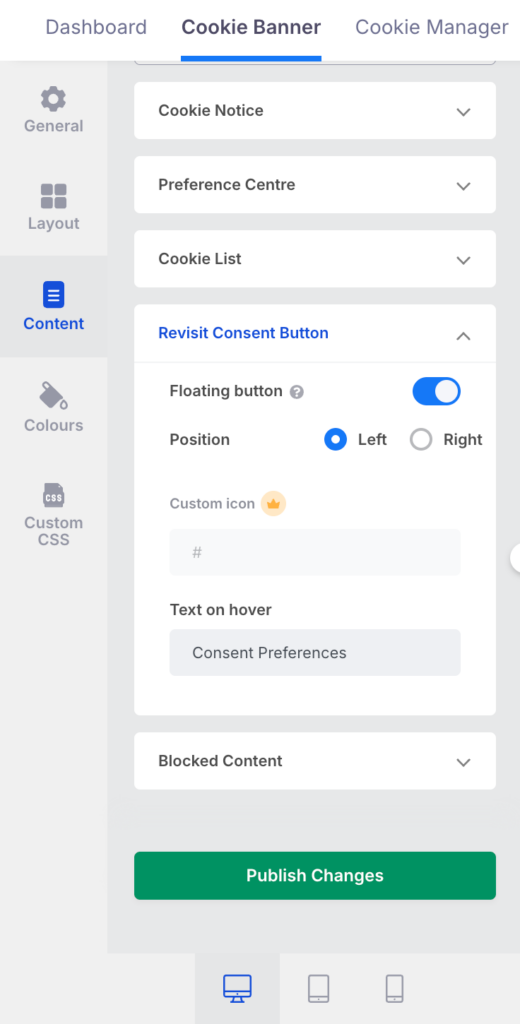
Offer a dedicated system where users can update or withdraw their consent at any time. You can fulfil this by providing a revisit consent widget, a cookie consent setting link on your policies, etc.
If you are a CookieYes user, this is as simple as activating the floating button toggle within the Cookie banner > Content > Revisit Consent Button.
Consent should be renewable after a set period (often 12 months).
Record and retain consents
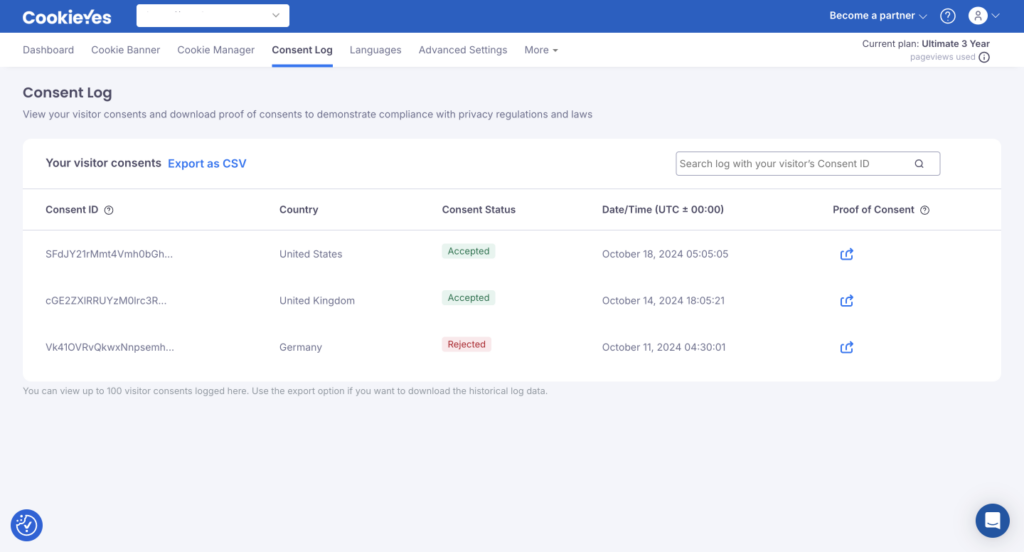
Keep logs of when and how consent was obtained, including the cookies accepted or rejected. Under GDPR, you must be able to demonstrate valid consent during an audit.
Here is an example of how user consent is recorded and displayed in the CookieYes dashboard. This makes it easy to store users’ consent preferences as proof of consent.
Block non‑essential cookies until consent is given
Automatic cookie scanning and blocking tools can prevent scripts from firing before consent. Regulators scrutinise websites that set tracking cookies before a user interacts with the banner.
Respect opt‑out signals
Recognise and implement global privacy control headers and “Do Not Track” or “Do Not Sell/Share” requests. Ensure third‑party vendors honour these choices.
Create a clear cookie policy
Your cookie policy should list each cookie, explain what data it collects, describe how long it persists, note third‑party involvement and explain users’ rights. Keep the policy up to date as cookie usage evolves.
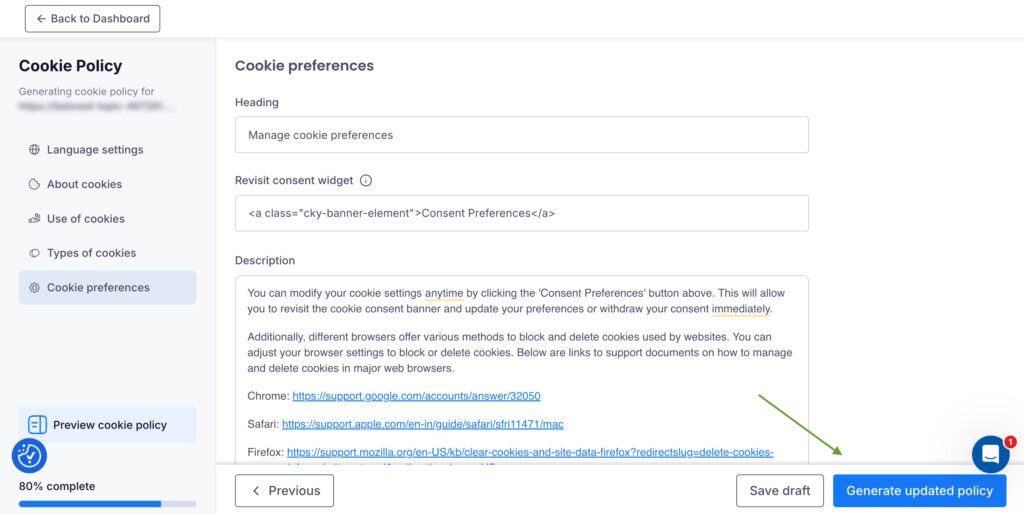
From the More dropdown on your CookieYes dashboard, open the Cookie Policy Generator to create an auto-filled cookie policy based on your website’s scan results. Click Generate button to review and publish it on your site.
Set up a cookie policy for your website
Create and publish your cookie policy today!
Sign up for free14-day free trialCancel anytime
Educate your team
Developers, marketers and content editors should understand how cookie consent works to avoid inadvertently adding scripts that bypass consent mechanisms.
How CookieYes helps in managing non-essential cookies
Handling non-essential cookies efficiently requires the right tools. CookieYes makes compliance and management easier through automation, transparency, and customization. Here’s how it helps:
Key benefits include:
- Automatic cookie scanning: Detects and categorises all cookies on your website, distinguishing between essential and non-essential ones.
- Scheduled scans: Keeps your cookie list updated automatically to reflect any new or removed cookies.
- Customisable cookie banner: Create a banner that fits your website’s design and brand tone while ensuring it meets compliance standards.
- Granular consent options: Allow users to accept or reject specific categories like analytics, marketing, or social media cookies.
- Geo-targeted compliance: Adapts consent banners automatically to regional privacy laws such as GDPR, CCPA, and LGPD.
- Consent logs and proof: Stores user consents securely for audit and compliance reporting.
- Honour UOOMs: Recognise universal opt-out signals from users.
- Policy generators: Create and publish privacy and cookie policies in simple steps.
- Multilingual support: Display cookie banners and policies in multiple languages to enhance global accessibility.
By using CookieYes, businesses can manage non-essential cookies effectively, maintain user trust, and ensure compliance across multiple jurisdictions, all while delivering a smooth and transparent user experience.
Want to manage non-essential cookies on your site?
Automate your cookie consent with CookieYes
Sign up for free14-day free trialCancel anytime
FAQ on non-essential cookies
Essential cookies enable core website functions such as security, page navigation, and login sessions, and usually do not require consent.
Non-essential cookies, on the other hand, support purposes like analytics or targeted advertising and require explicit user consent under most data protection laws.
Using non-essential cookies without valid consent can lead to enforcement action, depending on the applicable law.
In the EU and UK, setting non-essential cookies without prior consent breaches the ePrivacy rules and GDPR/UK GDPR and may result in fines up to 20 Million Euros, corrective orders, or mandatory changes to cookie banners.
In the US, most state privacy laws do not require opt-in consent for cookies, but businesses must provide clear notice and honor opt-out rights for targeted advertising or data sharing. Fines under laws like CCPA goes up to $7500.
Essential cookies typically include cookies that are strictly necessary for a website to function and provide services explicitly requested by the user. Common examples include:
- Session cookies that keep users logged in during a visit
- Authentication cookies used for secure access to user accounts
- Security cookies that protect against fraud and abuse
- Load-balancing cookies that ensure stable website performance
- Cookie preference or consent cookies that remember a user’s choices

Safna is the resident data privacy writer at CookieYes, where she breaks down privacy laws into actionable insights for businesses. The rest of her time is a mix of music, movies, and hot chocolate.