When a global brand builds trust online, it’s never just about design or speed. That’s why global websites like Ahrefs, Domino’s, VERO MODA, JACK & JONES, and MINISO use cookie banners that are not only CCPA or GDPR ready, but also thoughtfully designed with details that improve user experience, like:
- Branded colours and buttons
- Custom stylings or cookie messages
- Cookie-category toggles for granular control
- Multilingual banners for local audiences
- Policy links
- “Do not sell” link for easy opt-out
In this blog, we’ll break down 10 real CookieYes banner examples from well-known brands, and highlight the exact features they use, so you can understand what works, why it works, and how to set up a similar banner on your own site.
You don’t need custom development or complicated design work to get a banner like this. With CookieYes, you can build these same banner elements directly from the dashboard step by step, so your consent experience looks professional, feels trustworthy, and stays aligned with your brand.
Famous brands using CookieYes and what you can learn from them
Since the late 2010s, data privacy has transformed into a trust touchpoint. In other words, the way you ask for cookie consent should feel on-brand, stay intuitive, and still give users real control over their choices.
That’s why we’ve picked a few standout examples of brands using CookieYes cookie banners in smart, user-friendly ways. From custom colours and clear Accept/Reject buttons to multilingual banners and policy links, these designs show how cookie consent can be both compliant and conversion-friendly.
If any of these banner styles inspire you, you can explore them yourself. Don’t worry! We’ll also show how similar setups can be created inside CookieYes.
Why big brands choose CookieYes for cookie banners
Before we jump into examples, here’s what enterprise-grade consent banners typically need. CookieYes helps brands deliver all of that without needing a custom CMP build from scratch
- Branded design (fonts, colours, logo)
- Clear accept/reject options
- Reliable cookie preference centre
- Policy links
- Geo-based compliance readiness (GDPR, ePrivacy, etc.)
- Multi-language support
- Auto-cookie scans
- Incredible tech-support
- Consent mode implementation
- Easy implementation without slowing down the site
- Auto-generated banners
Related read
Ahrefs (SEO tool & marketing intelligence platform)
What Ahrefs does?
Ahrefs is a globally trusted SEO platform used by marketers, agencies, and businesses to research keywords, analyse competitors, and grow organic traffic.
How Ahrefs uses a CookieYes banner
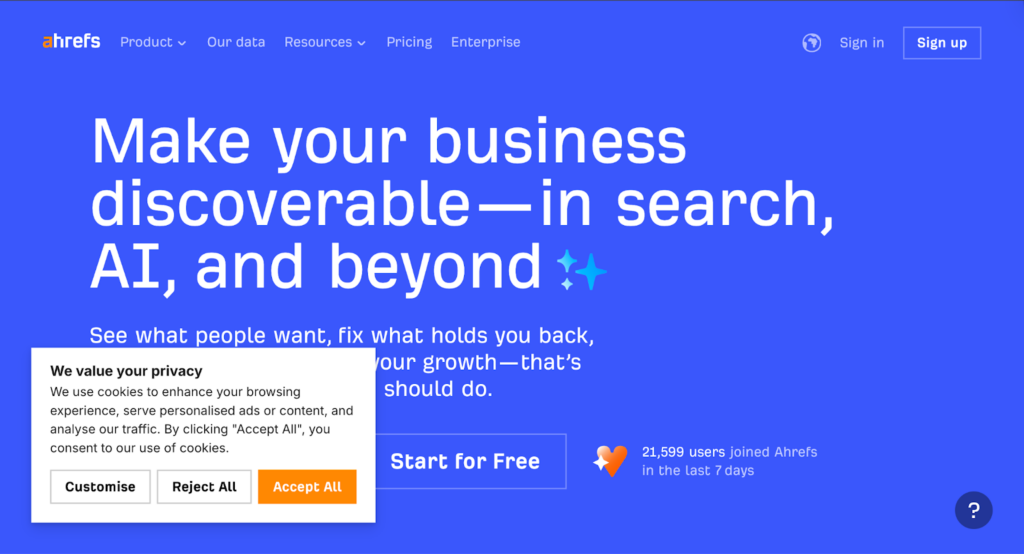
Ahrefs keeps its cookie banner clean, brand-aligned, and GDPR-ready, without turning it into a cluttered pop-up.
It uses custom colours for the button to match the site branding and has clear Accept all, Customise, and Reject buttons. Ahrefs has kept its cookie message short and easy-to-understand. The layout used is Box.
This is a great example of how a banner can feel both professional and user-respecting, while still being easy to navigate.
How can you recreate this using CookieYes?
Looks like something your website needs? Then, follow this path within your CookieYes dashboard:
Cookie banner > Colours > Customise light colours.
This way, you can easily create a cookie banner on your website that is unique and custom-made for your website.
HugeDomains (Domain marketplace)
What HugeDomains does
HugeDomains is a large domain marketplace where users can buy domain names across categories and industries.
How HugeDomains uses a CookieYes banner
The website keeps its banner visually simple, but with highly thoughtful interaction design.
It uses our GDPR template and keeps things on-brand with a custom green colour, so the banner blends naturally into the website instead of looking like a generic pop-up.
What’s especially notable is the Customise button. It comes with a small dropdown-style icon, which instantly signals that there are more options available.
And when the visitor clicks Customise, the layout gently rearranges itself: the main buttons shift up to the top-right, while a clear Save my preferences option stays visible in the bottom-right.
How can you recreate this using CookieYes?
If you like this style, you can recreate it inside CookieYes in just a few clicks.
Simply go to Cookie Banner → Layout, select the Banner cookie notice, and choose Push down as the preference centre style (with alignment set to Bottom).
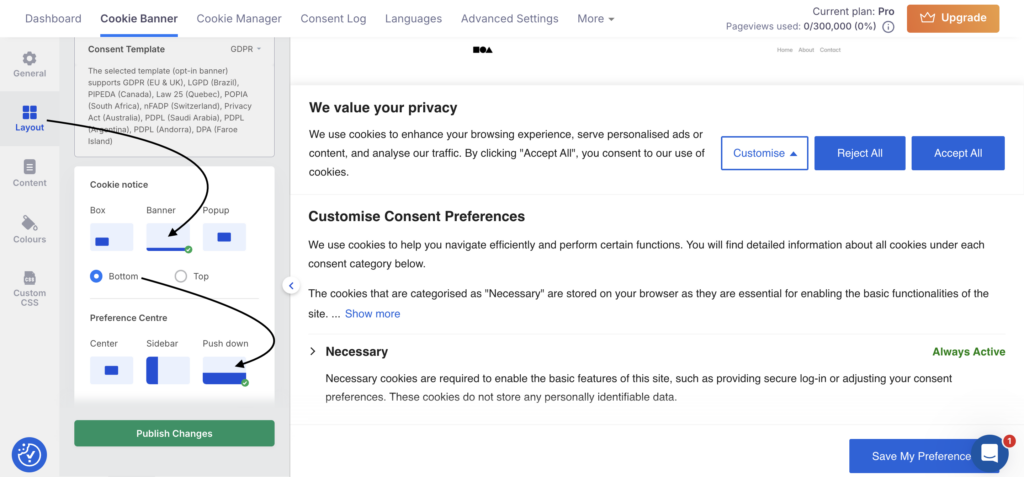
And if you’re in the mood to explore, experiment with other layouts like a sidebar preference centre or a box-style notice, similar to the Ahrefs banner.
It’s a subtle change, but it makes the whole interaction feel more intuitive, because users always know what to do next, without having to hunt for the final action.
Domino’s (Food delivery & restaurant brand)
What Domino’s does
Domino’s is one of the world’s most recognisable pizza brands, and its Greece website serves customers with local ordering and delivery.
How Domino’s uses a CookieYes banner
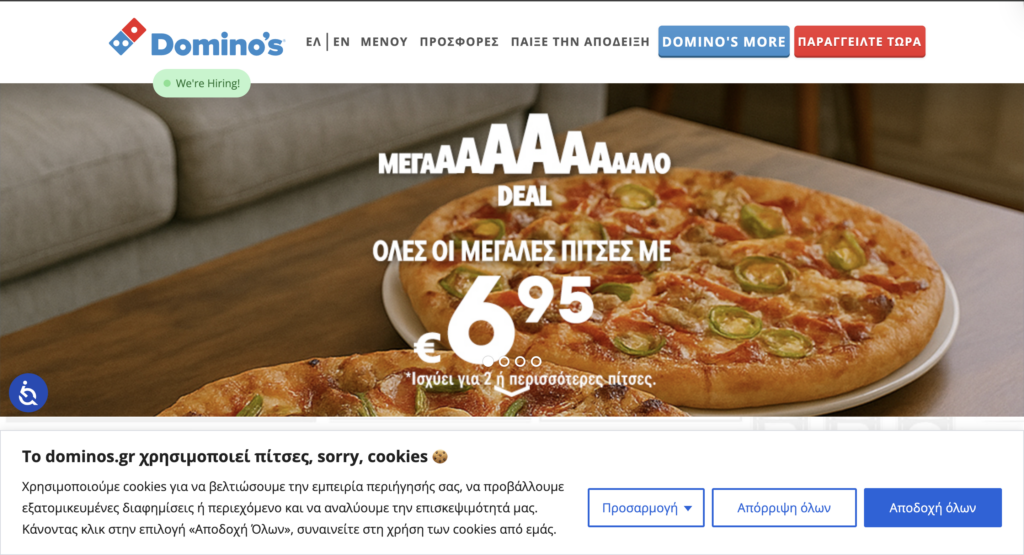
The Domino’s Greece banner is a great example of localisation done right:
- The banner appears in Greek
- It follows a GDPR banner format
- The experience feels built for real users in that region and not like a generic global template
This matters because multilingual consent isn’t just about convenience; rather, it supports clearer consent collection by ensuring users understand what they’re agreeing to. The multi-lingual and auto-translation feature on CookieYes makes this effortlessly possible.
How can you recreate this using CookieYes?
If your visitors come from different regions, a single-language banner could reduce clarity. CookieYes helps you display a banner in the language that fits your audience.
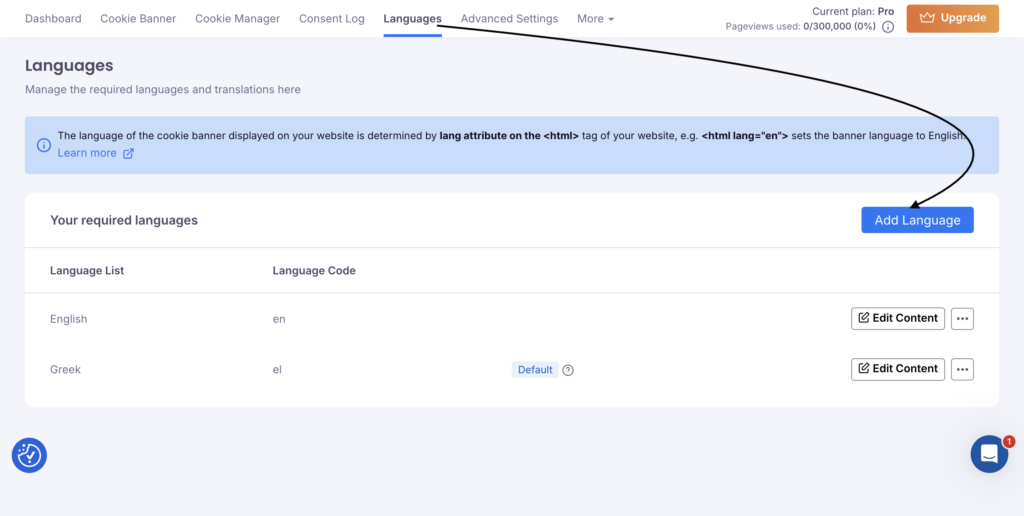
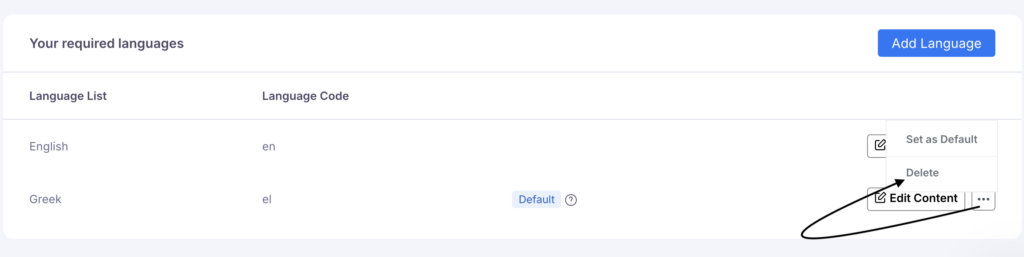
Start by logging in/signing up to your CookieYes account. From the top menu, click Languages, and then hit the Add Language button.
CookieYes lets you choose from 175+ languages, so you can easily match the banner language to your audience. Just select the language(s) you want (for example, Greek, Lithuanian, Spanish, etc.) and click Add.
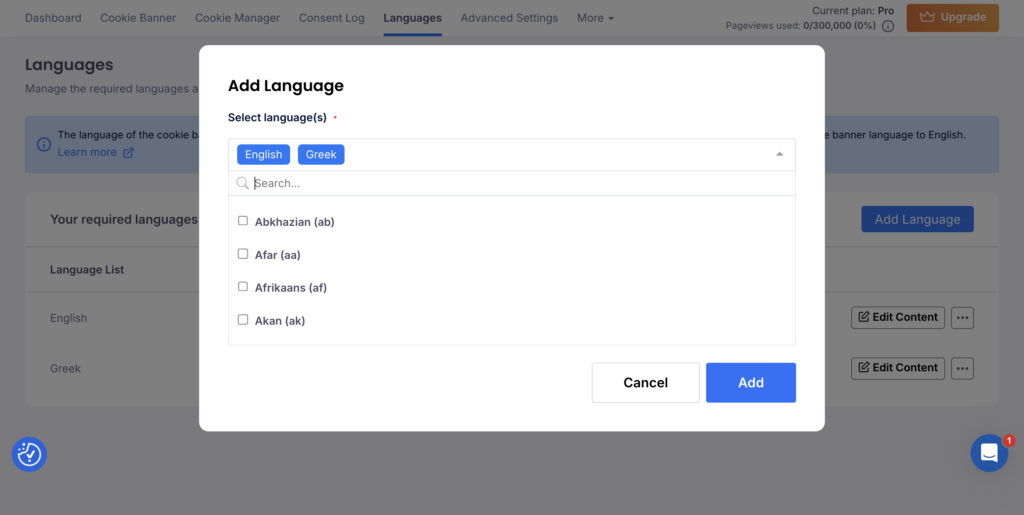
Once your languages are added, you can decide which one should appear as the default banner language. Simply click the three-dot (⋯) menu next to the language and choose Set as Default.
Plus, CookieYes also offers a multilingual privacy policy, keeping your privacy messaging consistent across regions.
VERO MODA (Global fashion retail brand)
What VERO MODA does
VERO MODA is a global fashion brand known for accessible, trend-driven clothing across multiple regions.
How VERO MODA uses a CookieYes banner
VERO MODA’s cookie banner looks clean, stylish, and user-friendly. Instead of using the default wording, they renamed the button to Cookie settings, which feels clearer and more natural than “Customise,” especially for everyday shoppers.
Their cookie message includes a scroll so the text stays readable without turning the banner into a wall of content, and they also include key links like the cookie policy, privacy policy, and Google’s privacy and terms right inside the banner for transparency. And, the preference centre is aligned to the left.
What really earns trust, though, is the design balance. Both Accept and Reject buttons are styled equally in black, so users don’t feel pushed into one choice.
How can you recreate this using CookieYes?
If you want this same premium feel, CookieYes lets you rename buttons, add policy links, and customise colours from one place, so your banner can look intentional instead of templated.
They use custom CSS for the scroll.
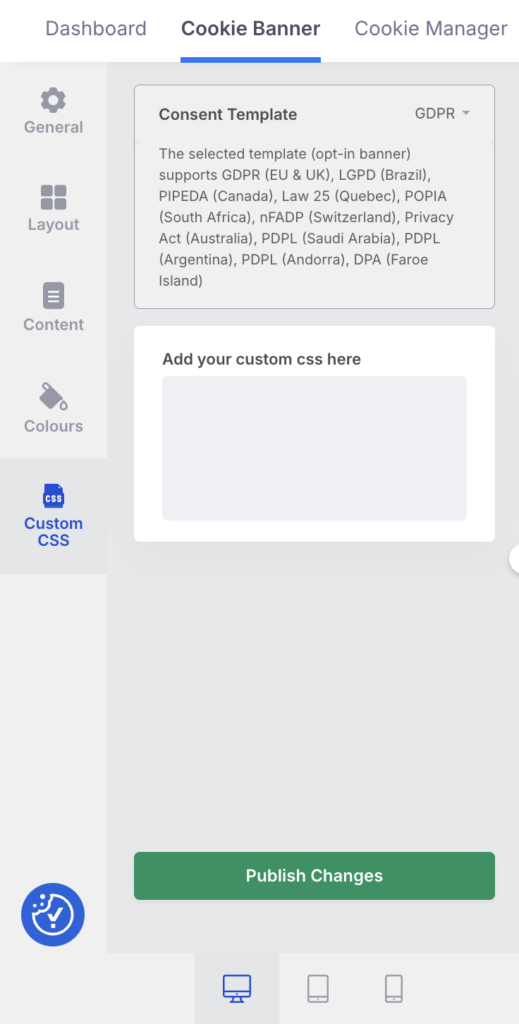
You can copy-paste this code for your banner:
.cky-notice-des {
 height: 100px;
 overflow-y: scroll;
}
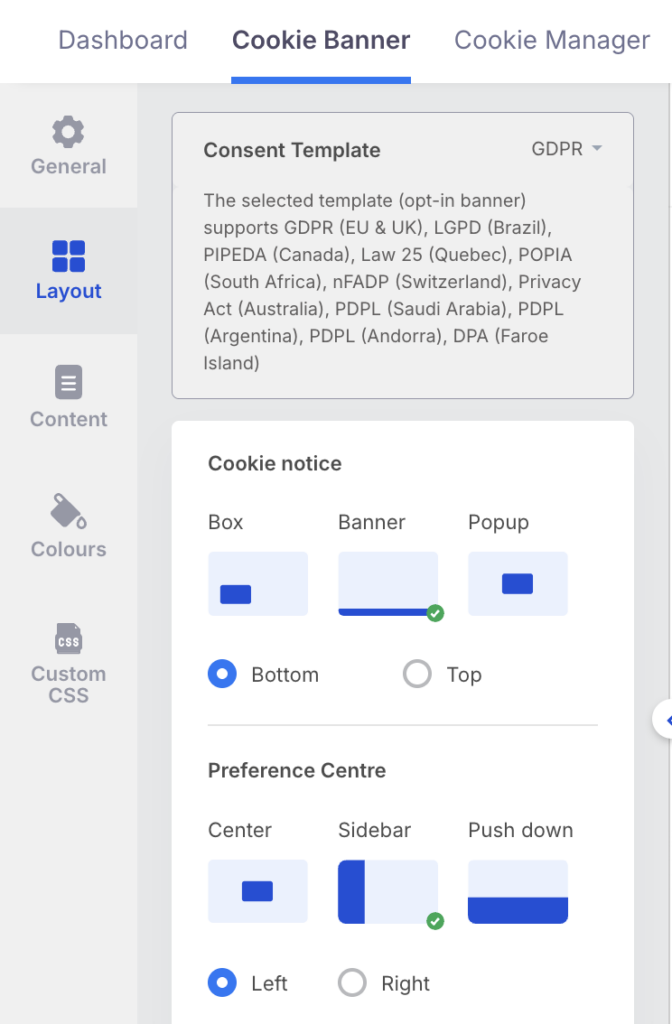
Now, for the exact banner alignment, choose Banner (Bottom alignment) for Cookie notice and Sidebar Preference centre.
MINISO (Retail & lifestyle products)
What MINISO Lithuania does
MINISO is a global retail brand known for lifestyle products, accessories, and affordable everyday essentials. Its Lithuania site serves local shoppers with a region-friendly experience.
How MINISO uses a CookieYes banner
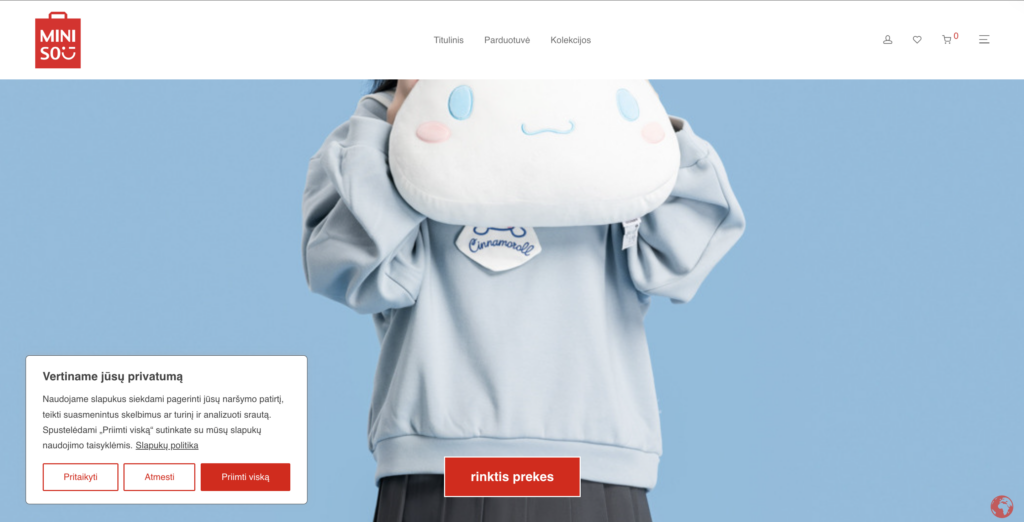
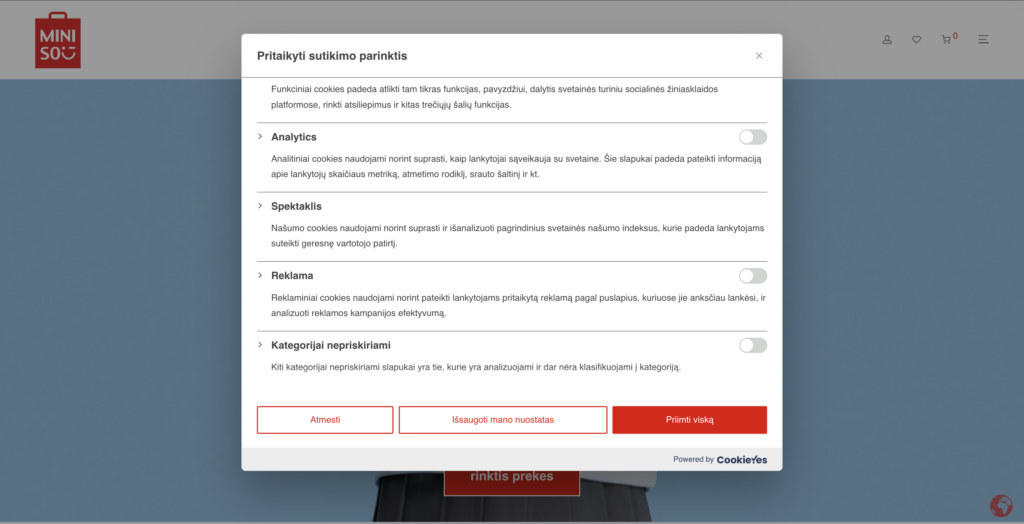
MINISO’s banner shows two powerful trust signals in seconds:
- The banner appears in Lithuanian, supporting local clarity
- A red custom button to match brand identity and create visual consistency
How can you recreate this using CookieYes?
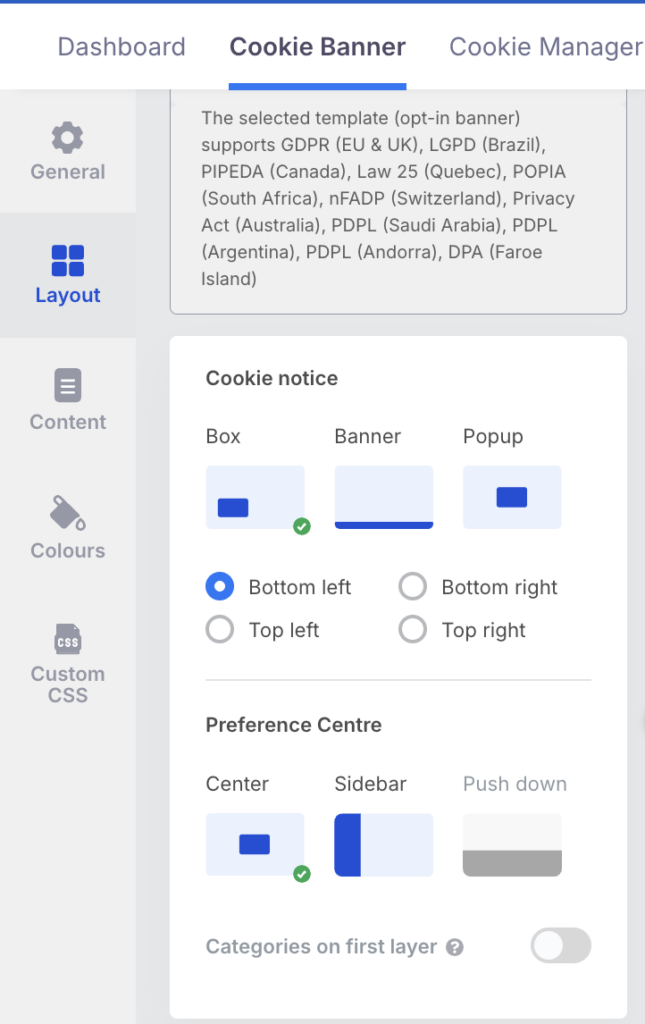
The banner layout used by MINISO in this example is a box style aligned to the bottom-left for the cookie notice. The preference centre is centre-aligned. Here is the exact styling:
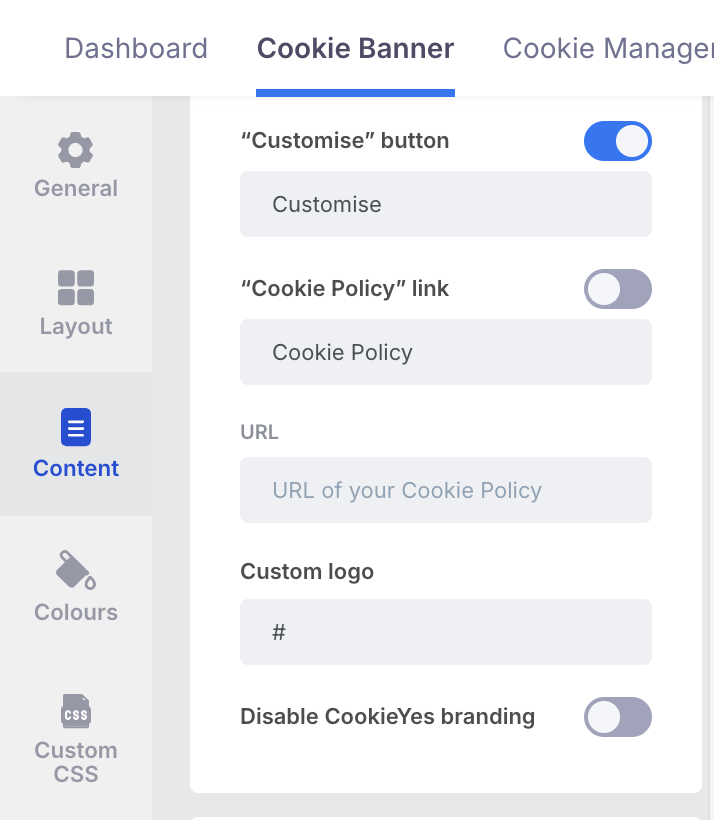
They have chosen to keep the CookieYes branding. However, it is also possible to remove it.
To disable our branding on your banner, click on the Disable CookieYes branding toggle.
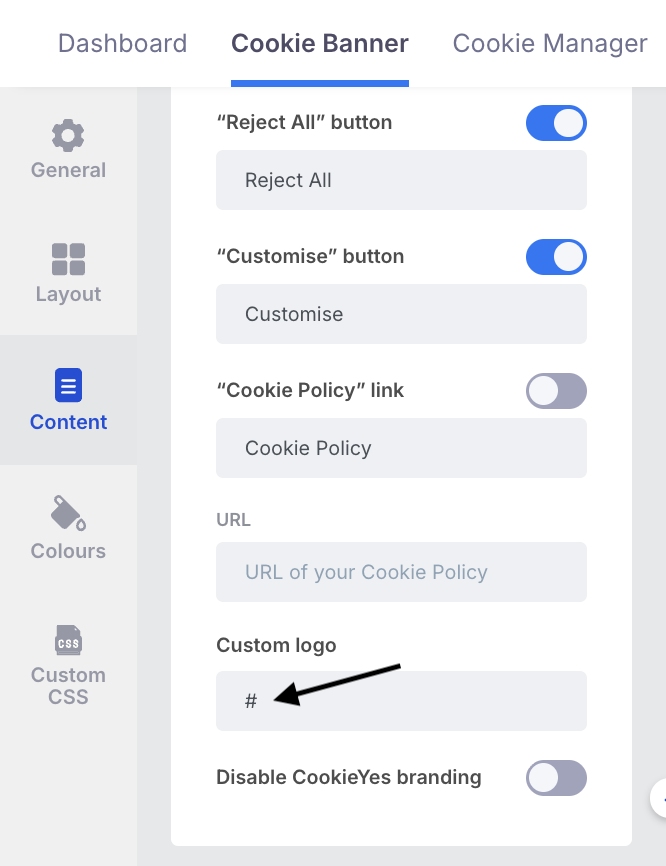
To personalise it further, you can add your logo to the cookie banner—just paste your logo URL into this field.
JACK & JONES (Menswear & lifestyle brand)
What JACK & JONES does
JACK & JONES is an internationally recognised menswear brand with a strong ecommerce presence across Europe and beyond.
How Jack & Jones uses a CookieYes banner
JACK & JONES keeps its cookie banner bold and straightforward, which makes perfect sense for a brand that sells confidence. The black button styling feels consistent with their visual identity, and the banner gives users equal power to accept or reject cookies. It reduces the risk of dark patterns and supports fair user choice.
How can you recreate this using CookieYes?
The layout used is “banner” (bottom), and the preference centre is aligned to the centre.
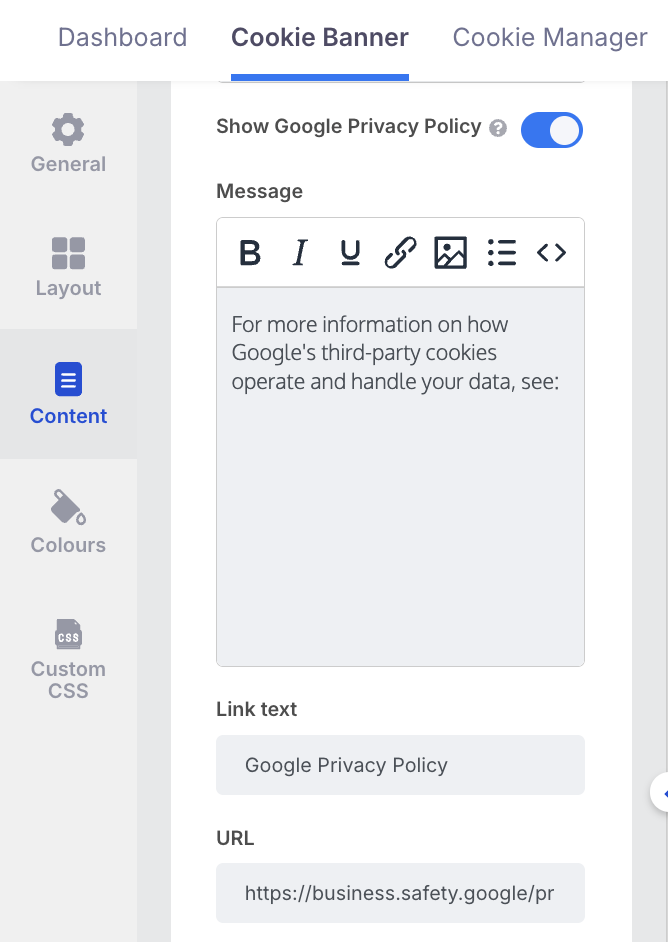
Like VERO MODA, the banner supports scrolling content for clarity and includes links to the cookie policy, privacy policy, and Google’s privacy and terms, so nothing feels hidden.
By enabling the Google Privacy Policy, you can easily link Google’s privacy terms on your banner.
WebYes (Website audit tool)
What WebYes does
WebYes is a website audit tool that diagnoses and help fix performance and accessibility issues on websites.
How WebYes uses a CookieYes banner
What stands out in WebYes cookie banner setup is the emphasis on clear consent flow, banner usability and easy access to preferences so users can make granular choices.
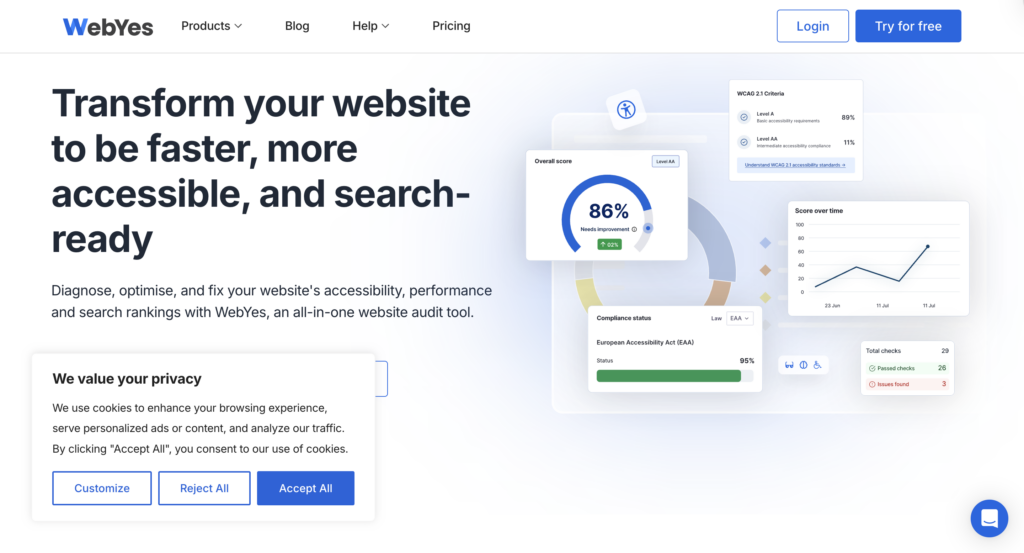
Even when a banner is minimal, CookieYes allows it to remain functional and compliance-friendly, without adding friction.
How can you recreate this using CookieYes?
WebYes uses the GDPR template in CookieYes. The layout here is “Box” aligned to the bottom-left.
Atlanta Attachment Company (Sewing automation)
What Atlatt does
Atlanta Attachment Company (Atlatt) is a global supplier of industrial sewing and automation machinery for mattresses, apparel, automotive interiors, and furniture manufacturing, including heavy-duty machines, packaging equipment, and sewing attachments.
How Atlatt uses a CookieYes banner
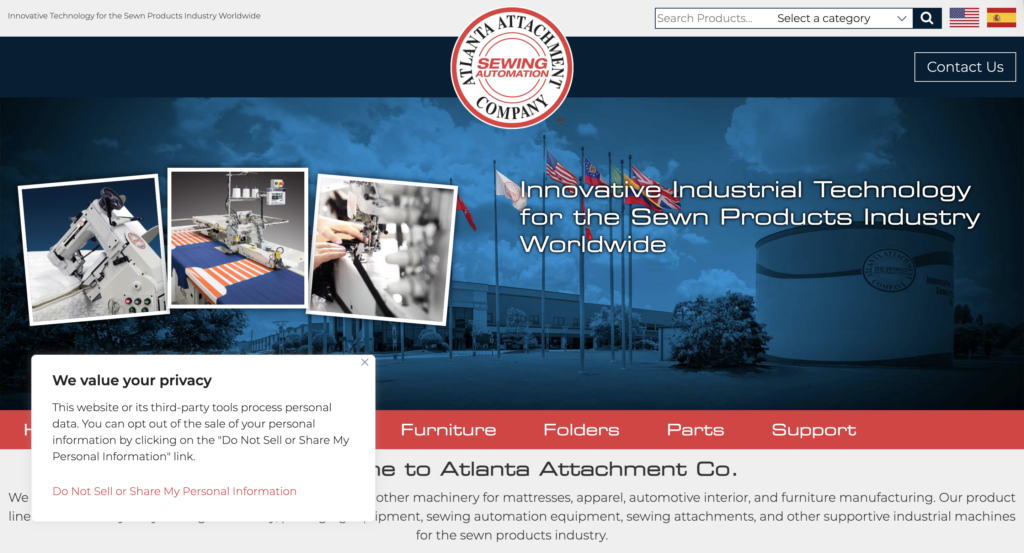
Atlatt uses a short, clear CCPA banner that explains cookie usage in plain language. It also provides the Do Not Sell or Share My Personal Information link placed right inside the banner, making opt-out feel effortless and immediate. The link is also styled in a custom red colour to suit the brand’s colour palette.
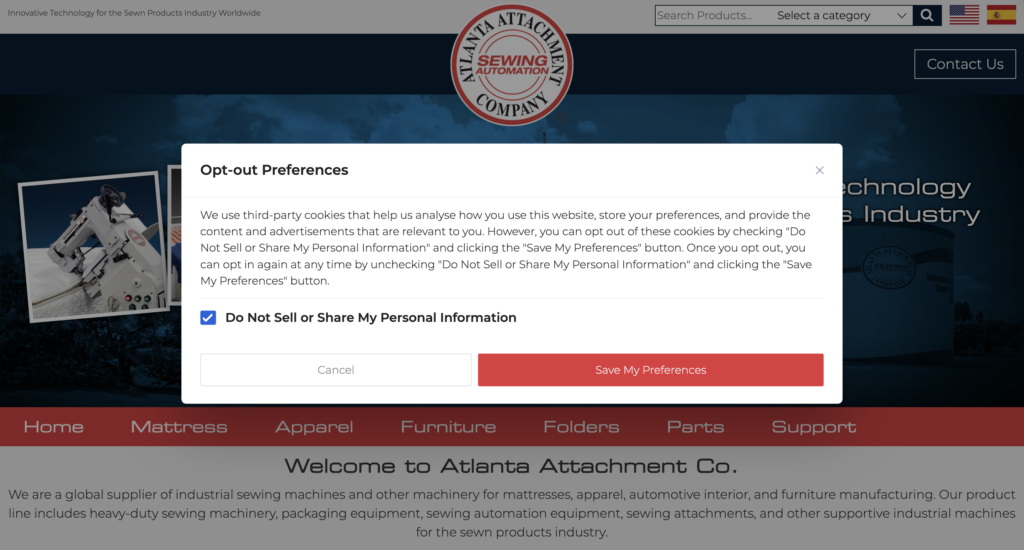
Once you click on “Do not Sell”, you will be taken to the opt-out preference centre. It is centre-aligned.
How can you recreate this using CookieYes?
If you want to build a similar CCPA-friendly experience on your own site, CookieYes makes it easy to add a “Do Not Sell” option directly into your banner content and style it to match your brand colours, so compliance feels seamless and not disruptive.
After selecting US state laws as the consent template, navigate to colours > custom > cookie notice > Do not sell link > Text and choose your preferred colour. The layout uses a box style aligned to the bottom-left.
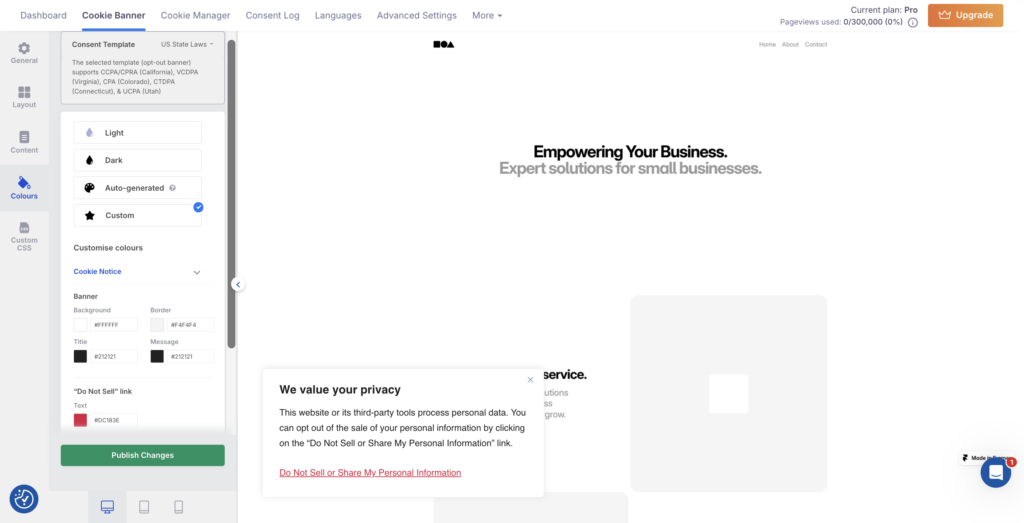
You can further customise the checkbox colour, button colours, button names, and more.
AHP (Behavioural health consulting)
What AHP does
Advocates for Human Potential (AHP) helps agencies and providers improve behavioural health care using evidence-based solutions.
How AHP uses a CookieYes banner
AHP keeps its cookie banner straightforward, using a clean banner-style layout aligned to the bottom of the screen. That placement is a smart choice as it stays visible enough to be compliant and informative, but it doesn’t interrupt the browsing experience or cover the main content.
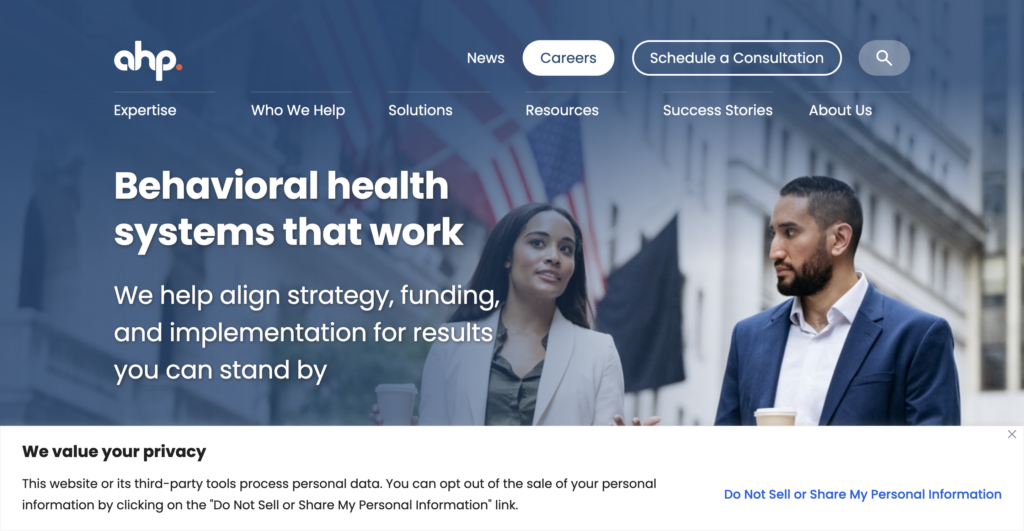
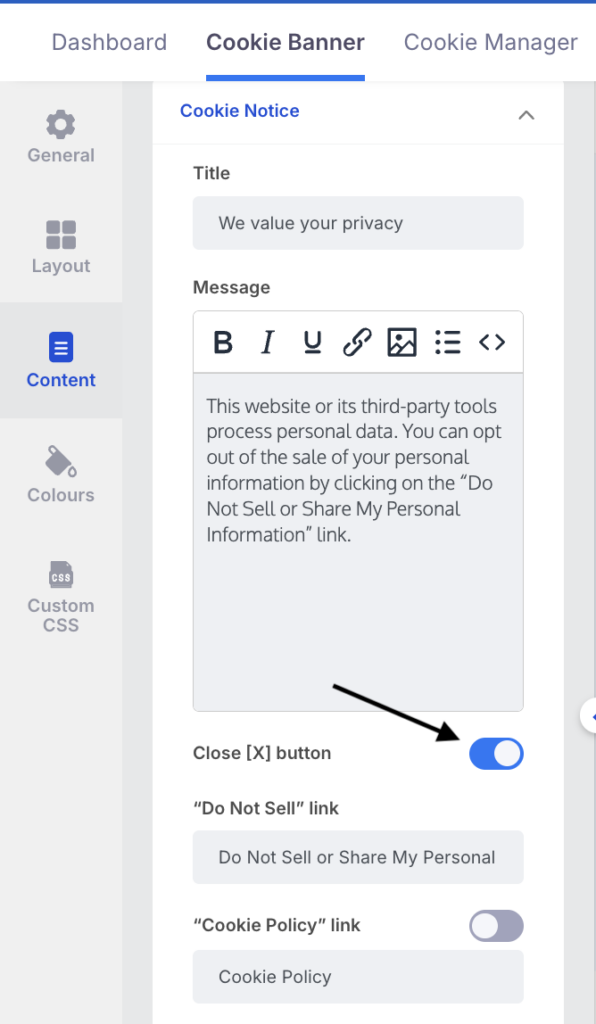
It uses our default cookie message, with the “Do not sell” option placed right where users can’t miss it, making opt-out feel easy and immediate, not buried or complicated. The banner also has a close button.
How can you recreate this using CookieYes?
If you like this low-friction style, you can recreate it in CookieYes by choosing the Banner layout and setting the position to Bottom, then adding a visible opt-out link so users can take action without extra clicks.

Use the toggle to add or remove the close button. It’s available in all templates.
Harpoon Brewery (Craft beer & beverage brand)
What Harpoon Brewery does
Harpoon Brewery is an employee-owned craft brewery founded in Boston in 1986, known for its IPA, seasonal brews, and taprooms in Boston and Vermont.
How Harpoon Brewery uses a CookieYes banner
Harpoon Brewery’s cookie banner is a great reminder that consent banners don’t have to feel dull or out of place. They can still look bold, branded, and intentionally designed. The banner sits neatly aligned to the bottom, giving users a clear privacy message without interrupting the browsing experience or covering the visuals on the page.
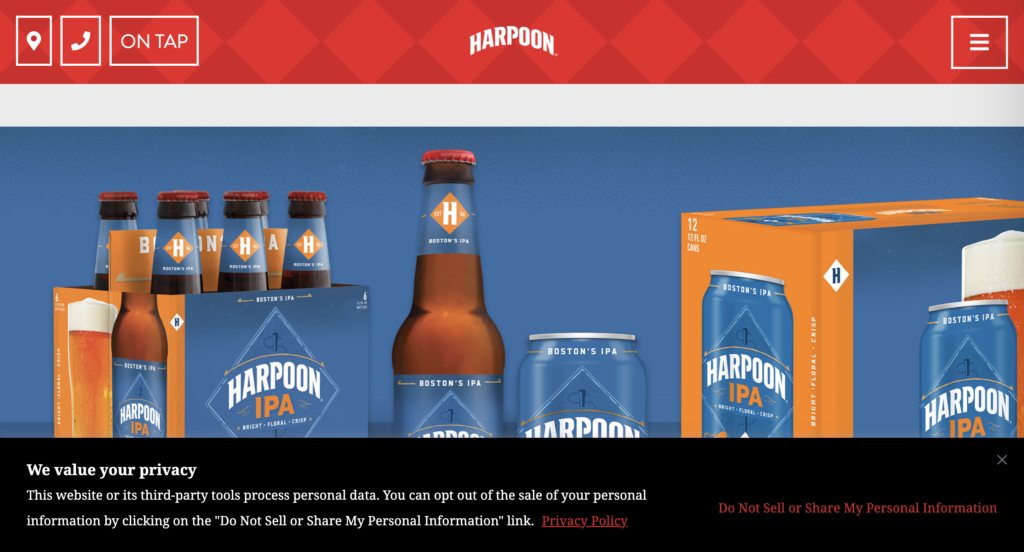
What really makes it stand out is the styling. The banner uses a dark background for contrast and highlights key actions, like the “Do Not Sell or Share My Personal Information” link, in a striking red colour that matches Harpoon’s brand palette.
How can you recreate this using CookieYes?
If you love this kind of bold, brand-forward banner, CookieYes makes it easy to replicate. For the black background, simply select dark theme.
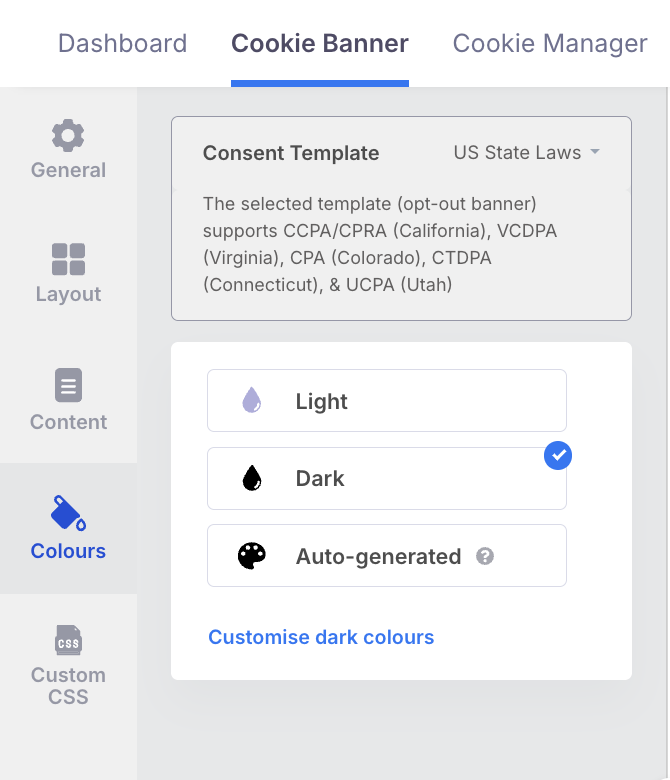
For the layout, choose Bottom-aligned Banner style and customise the colours to match your brand identity.
If you’re not sure which colour is best for your website, try our auto-generated banner feature. It automatically creates a cookie banner that aligns with your website’s design.
Build your banner like the big brands
Create a branded, GDPR & CCPA-ready cookie banner in minutes with CookieYes.
Start for free14-day free trialCancel anytime
When creating a cookie banner, consider your legal requirements based on the privacy laws that apply to your business (such as GDPR or CCPA). Make sure the banner offers clear Accept/Reject choices, a preference centre with cookie category toggles, visible cookie and privacy policy links, and options like “Do Not Sell or Share” where needed, while keeping the design on-brand and user-friendly.
GDPR-compliant cookie text should be clear, specific, and written in plain language, explaining what cookies are used for (and whether third parties are involved), while linking to your cookie/privacy policy for full details. It must offer real choice with equally visible Accept and Reject buttons, plus a Customise option for granular control. Ensure non-essential cookies stay off until consent is given. Your policy should also explain cookie categories and tell users how to change or withdraw consent anytime.
Designing a cookie banner is easiest when you use a Consent Management Platform (CMP), because it lets you create a compliant banner without custom coding, manage cookie categories automatically, and show the right consent options based on laws like GDPR or CCPA.
With CookieYes, you can design a professional banner in minutes by choosing a layout (banner, box, or sidebar), matching your brand colours and button styles, enabling clear Accept/Reject choices, adding a preference centre with cookie toggles, and including cookie/privacy policy links. You can also set up multilingual banners and CCPA opt-out options like “Do Not Sell or Share My Personal Information”, all from the CookieYes dashboard.

Safna is the resident data privacy writer at CookieYes, where she breaks down privacy laws into actionable insights for businesses. The rest of her time is a mix of music, movies, and hot chocolate.